What is a Linux Command

If you’re someone into tech, or you have friends in tech, you may have heard the term “commands.” You may have also watched a movie where a hacker sits at their computer with streams of green text floating up and down the screen while they tap away at random keys on their keyboard. That interface displaying the stream of text is known as the CLI (Command Line Interface), popularly known as the Terminal or Console. Unlike a GUI (Graphical User Interface) where you click buttons, the CLI is a text-based interface where you type instructions. What the hacker is typing are commands, and the green and white text on the screen represents the input (what the hacker types) and the output (the response or result).
So what exactly is a command?
What Is a Command?
A command is simply a program that tells the operating system what to do. To execute a command you need a CLI such as a Terminal or Console.
If you’re an experienced Linux user who has switched across different distros, you may have come across a situation where one of your favourite commands doesn’t work on a different Linux distro. This is usually because that CLI program isn’t installed on that distro by default, so you’ll have to install it yourself. That said, there are some commands you can always expect to find across all distros these are called built-in commands.
Types of Commands
1. Built-in Shell Commands These are commands that come built into the Linux shell. You can always expect to find them installed across all Linux distros. An example is cd. 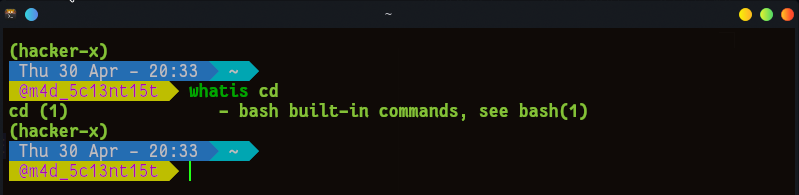
2. Pre-installed / Installable CLI Programs These are commands that may or may not be installed by default depending on the distro. Different Linux distros come with different sets of commands depending on their purpose a distro is simply a version of Linux built for a specific use case (e.g. Kali for hacking, Ubuntu for general use, Fedora for developers). Examples of these commands include npm, nmap, and traceroute.
So if you ever come across a situation where a command that worked on one distro doesn’t work on another, it’s usually because it isn’t installed. The fix is simple just install it.
Reasons Why a Linux Command May Not Work
- The command is not installed on your current distro
- You have a typo in the command name
- You don’t have the required permissions to run it
- The command syntax is wrong check the manual by running
man <command>
Conclusion
Alright, so that’s basically what a command is, this was just a general overview and a lot of details are missing here but I hope you learned something new today. If you want to go deeper into commands and really understand how they work, sign up to my newsletter as I’ll be covering it in a lot more detail soon. Thanks for reading and I hope to see you in the next one.